SSH#
SSH#
SSH is the default operator transport: encrypted shell sessions, file copy, port forwarding, and key-based authentication. Each subsection covers one capability, from generating a new key pair to forwarding a port and tunneling traffic through a jump host.
The flow of a key-based SSH login. The operator’s private key
never leaves the laptop; the server only sees the public half
in ~/.ssh/authorized_keys and a signed challenge proving the
client holds the private key:
        sequenceDiagram
    participant C as client
    participant S as server

    Note left of C: ~/.ssh/id_ed25519        (private)<br/>~/.ssh/id_ed25519.pub    (public)
    Note right of S: ~/.ssh/authorized_keys<br/>ed25519 AAAA... operator@laptop<br/>ed25519 AAAA... alice@admin

    C->>S: 1. TCP :22
    S->>C: 2. server host key (id_*_host_key)
    Note over C: verify vs ~/.ssh/known_hosts
    C->>S: 3. KEX (ECDH / X25519)
    S->>C: 3. KEX
    Note over C,S: shared session key
    C->>S: 4. publickey auth, "I am operator"
    S->>C: 5. challenge, sign this nonce
    C->>S: 6. signature(nonce, private key)
    S->>C: 7. verify with stored public key → OK
    Note over C,S: encrypted shell channel
The private key never leaves the client; only signatures over server-issued nonces cross the wire.
Generate keys#
Create an SSH key pair. Default location is ~/.ssh/id_<type>;
the public half (.pub) is what goes on the remote server, and
the private half stays local. Prefer ed25519 (modern, fast,
short keys) over rsa.
$ ssh-keygen -t ed25519 -C "operator@cybint"
$ ssh-keygen -t rsa -b 4096 -C "operator@cybint"
$ ssh-keygen -t ed25519 -f ~/.ssh/id_bastion -N ''
$ ssh-keygen -y -f ~/.ssh/id_ed25519
$ ssh-keygen -lf ~/.ssh/id_ed25519.pub
Copy keys#
Install a public key on a remote host so the operator can log in
without a password. ssh-copy-id does this safely (appends to
~/.ssh/authorized_keys with correct perms); the manual variant
is useful when ssh-copy-id is missing.
$ ssh-copy-id user@host
$ ssh-copy-id -i ~/.ssh/id_bastion.pub user@bastion

$ cat ~/.ssh/id_ed25519.pub | \
    ssh user@host 'mkdir -p ~/.ssh && chmod 700 ~/.ssh && \
                   cat >> ~/.ssh/authorized_keys && \
                   chmod 600 ~/.ssh/authorized_keys'
Remote Login#
Open an interactive shell on a remote host, run a one-shot command,
or chain through a bastion. Persistent settings live in
~/.ssh/config.
$ ssh user@host
$ ssh -p 2222 user@host
$ ssh -i ~/.ssh/id_bastion user@bastion
$ ssh user@host 'uptime; df -h'
$ ssh -J user@bastion user@private.internal
Local Forward#
-L LPORT:RHOST:RPORT, connections to localhost:LPORT are
tunnelled through the SSH server to RHOST:RPORT. Use to reach a
service that is only routable from the bastion’s network.

        flowchart LR
    L["laptop :5432"] -->|SSH tunnel| B[bastion]
    B -->|private| D["db :5432"]
$ ssh -L 5432:db.internal:5432 user@bastion
$ psql -h localhost -p 5432

$ ssh -L 8080:127.0.0.1:80 user@web
$ ssh -fNT -L 9200:es.internal:9200 user@bastion
Remote Forward#
-R RPORT:LHOST:RPORT, the SSH server opens RPORT and
tunnels it back to the client’s network. Use to expose a local
service to a remote host (often used for reverse callbacks).

        flowchart RL
    I[internet] -->|inbound| P["public :9000"]
    P -->|SSH tunnel| L["laptop :9000"]
$ ssh -R 9000:localhost:9000 user@public
$ ssh -R 0.0.0.0:9000:localhost:9000 user@public
$ ssh -fNT -R 2222:localhost:22 user@public
Dynamic Forward#
-D LPORT, open a SOCKS5 proxy on localhost:LPORT. Anything
SOCKS-aware can route through the SSH server.
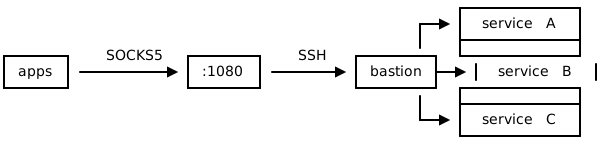
        flowchart LR
    A[apps] -->|SOCKS5| S[":1080"]
    S -->|SSH| B[bastion]
    B --> SA[service A]
    B --> SB[service B]
    B --> SC[service C]
$ ssh -D 1080 user@host
$ curl --socks5 127.0.0.1:1080 https://internal.example.com
$ curl --socks5-hostname 127.0.0.1:1080 https://target

$ ssh -fNT -D 1080 -o ExitOnForwardFailure=yes user@host
Port Forwarding#
Useful flags that apply to -L / -R / -D:
Flag |
Effect |
|---|---|
|
Don’t run a remote command (just forward) |
|
Background after authentication |
|
No pseudo-tty |
|
Allow other LAN hosts to use the local forward |
|
Abort if a forward can’t bind |
|
Keep idle tunnels alive |
The “tunnel as a service” pattern combines them:
$ ssh -fNT -o ExitOnForwardFailure=yes \
    -o ServerAliveInterval=60 \
    -L 5432:db.internal:5432 user@bastion
For non-SSH alternatives, reach for socat, ncat, iptables
DNAT, kubectl port-forward, frp, or chisel directly.
X11 Forwarding#
Run a graphical program on the remote host and have it open windows
on the local display. Requires an X server on the client (Xorg,
XQuartz on macOS, VcXsrv on Windows) and X11Forwarding yes
in the server’s sshd_config.
$ ssh -X user@host
$ ssh -Y user@host
$ ssh -X user@host wireshark